

Angular SEO: A Practical Guide to Making Angular Websites Search-Friendly
Angular is a powerful framework for building interactive websites and web applications. However, its client-side rendering model can create challenges for search engine optimisation (SEO) if pages are not set up carefully. Search engines need to discover, render and understand each page’s content, while users expect fast, accessible experiences across devices.
With the right approach, an Angular website can be both highly interactive and easy for search engines to crawl. This guide explains the main considerations, from rendering and metadata to performance and structured data.
Why Angular SEO needs special attention
In a traditional server-rendered website, the server sends a page containing its main content in the initial HTML response. In a client-side Angular application, the browser may receive a relatively empty HTML shell and then rely on JavaScript to load and display the content.
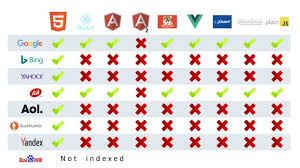
Major search engines can render JavaScript, but this may take additional processing. Other crawlers, social media platforms and discovery tools may not render it as reliably. If important content only appears after JavaScript runs, it can be harder for those systems to access and interpret.
The aim is not to avoid Angular. It is to ensure that important pages provide clear, accessible content and technical signals from the outset.
Choose the right rendering approach
Rendering determines how a page’s HTML is created and delivered. Angular projects can use several approaches, depending on the purpose of the site.
Client-side rendering
With client-side rendering, the browser runs the application and creates the page content. This can work well for tools and applications where users sign in or interact extensively. For public-facing pages that depend on organic search, relying solely on client-side rendering may introduce avoidable crawling and performance challenges.
Server-side rendering
Server-side rendering (SSR) generates the page HTML on a server before it is sent to the browser. This gives crawlers and users meaningful content in the initial response and can improve perceived loading speed. Angular supports server-side rendering through its Angular SSR tooling.
Prerendering
Prerendering creates HTML pages in advance, usually during the build process. It can be a good fit for content that changes infrequently, such as service pages, location pages or articles. Dynamic areas of a site may need SSR or client-side functionality alongside prerendered routes.
The best option depends on how often content changes, how many routes the site has and what functionality users need. Whichever approach is chosen, test the HTML that is actually delivered to visitors and crawlers rather than relying only on what appears in a browser after the application has loaded.
Make every important route crawlable
Angular applications commonly use client-side routing. Make sure that each important page has a stable, descriptive URL and can be reached through standard links. Use anchor elements with a real href attribute for navigation, rather than relying exclusively on click handlers or buttons.
For example, a link to a service page should be rendered as a normal link:
<a routerLink="/services/family-law">Family law services</a>Also check that:
- Important pages are linked from other relevant pages.
- Routes return the correct page content when opened directly.
- Unknown URLs return an appropriate not-found response or page.
- Redirects are implemented consistently and do not create redirect loops.
- Internal links do not rely on query parameters or temporary session state to identify core content.
Set unique titles and meta descriptions
Each indexable page should have a distinct, relevant title and meta description. Angular’s Title and Meta services can be used to manage these values as routes change.
import { Title, Meta } from '@angular/platform-browser';


constructor(


  private title: Title,


  private meta: Meta


) {}


ngOnInit(): void {


  this.title.setTitle('Family Law Services | Example Legal');


  this.meta.updateTag({


    name: 'description',


    content: 'Find out how our family law team can help with your legal matter.'


  });


}
For a larger website, page metadata should be generated from route or content data rather than copied across components. If metadata is added in the browser, confirm that it is also available in the rendered HTML delivered to crawlers when using SSR or prerendering.
Titles and descriptions should accurately describe the page and help people decide whether to visit. They are not a place to repeat keywords unnaturally, and search engines may choose to display different snippets in results.
Use headings and content to communicate page purpose
Every important page should have useful, original content that answers the visitor’s needs. Organise it with a clear heading structure: a descriptive h1 for the main topic, followed by logical subheadings.
Do not rely on text embedded in images or content that appears only after a user interaction. Keep key information available in the page’s rendered content. For sites in sensitive sectors, such as law or finance, demonstrate relevant expertise and make authorship, credentials and contact information easy to find.
Manage canonical URLs and duplicate content
Angular applications can sometimes expose the same content at multiple URLs, particularly when query parameters, trailing slashes or alternative route formats are involved. Choose a preferred URL for each page and use a canonical link to indicate it.
Canonical tags should be included in the rendered page HTML and should point to a valid, indexable version of the page. They are a signal rather than a guarantee, so keep internal links, redirects and sitemap URLs consistent with the preferred version.
Add structured data where it is relevant
Structured data can help search engines interpret information on a page. Depending on the site, suitable types may include organisation, local business, article or breadcrumb structured data. Only mark up information that is visible on the page and accurately reflects the business.
Structured data does not guarantee enhanced search results. Validate it with appropriate testing tools, and ensure it is present in the rendered HTML if it is added dynamically.
Improve speed and Core Web Vitals
Performance affects the experience of using a website and can contribute to search performance. Angular sites can become slow if they ship too much JavaScript, load large images or delay their main content while the application starts.
- Use lazy loading for suitable routes and non-essential components.
- Compress images and serve them at appropriate dimensions.
- Reduce unnecessary JavaScript and third-party scripts.
- Reserve space for images and other content to reduce layout shifts.
- Consider SSR or prerendering where faster initial content would benefit users.
- Test real-world mobile performance as well as desktop performance.
Use performance reports to identify specific issues instead of making changes based on assumptions. A faster application is valuable, but not at the cost of removing useful content or functionality.
Create an XML sitemap and robots.txt file
An XML sitemap can help search engines discover the site’s preferred, indexable URLs. Include canonical pages that return successful responses, and keep the sitemap updated as content changes. A robots.txt file can guide crawlers, but it should not be used to hide content that should be removed from search results; access restrictions and noindex directives serve different purposes.
Submit the sitemap through the relevant search engine webmaster tools and check for crawl or indexing issues regularly.
Test the rendered website
Testing is essential because the source code of an Angular application does not always show what a crawler receives. Review the initial HTML response, test important routes directly and inspect pages using search engine URL inspection tools.
Check that:
- Main page content appears in the rendered HTML.
- Titles, descriptions and canonical tags are correct for each route.
- Links are discoverable and lead to the intended pages.
- There are no accidental noindex directives or blocked resources.
- Pages work when loaded directly, not only when reached through in-app navigation.
Common Angular SEO mistakes
- Relying only on client-side rendering for pages that need to perform in organic search.
- Using the same title and meta description across multiple routes.
- Leaving important content hidden until a click or other interaction.
- Using links that crawlers cannot follow as standard URLs.
- Serving error pages with successful HTTP status codes.
- Adding structured data that does not match visible page content.
- Forgetting to update sitemap and canonical URLs after changing routes.
Conclusion
Angular SEO is about combining sound technical implementation with useful content. Server-side rendering or prerendering can make important pages easier to access, while clear routes, unique metadata, fast loading and crawlable links help search engines understand the site.
There is no single configuration that suits every Angular project. Start by identifying the pages that need to attract organic traffic, choose a suitable rendering strategy, and test those pages from the perspective of both users and crawlers. Regular monitoring will help catch problems as the application and its content grow.